Master Your Money with a Dynamic Google Sheets Budget Planner: Track Income, Expenses & Savings Easily
📅Master Your Money with a Dynamic Google Sheets Budget Planner: Track Income, Expenses & Savings Easily👈👍
Take control of your finances with a fully dynamic personal budget planner in Google Sheets. Learn how to track income, monitor expenses, set savings goals, and build financial confidence. Includes features, setup guide, pros, cons, and expert tips.
Master Your Money with a Dynamic Google Sheets Budget Planner
A personal budget is one of the most powerful financial tools available. It helps you understand where your money goes, plan ahead, avoid overspending, and confidently work toward financial goals. But instead of relying on static spreadsheets or complicated budgeting apps, a fully dynamic budget planner in Google Sheets gives you flexibility, automation, and control — all in one place.
With a well-designed Google Sheets budget planner, you can go far beyond simple income-expense tracking. You can create a living financial system that updates automatically, analyzes trends, predicts outcomes, and keeps you accountable every month.
What Is a Dynamic Budget Planner in Google Sheets?
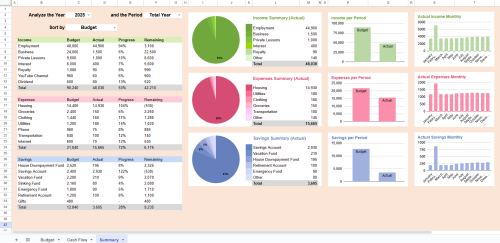
A dynamic Google Sheets budget planner is more than a basic spreadsheet. It typically includes:
- Automated formulas
- Linked income and expense categories
- Drop-down menus
- Monthly and yearly summaries
- Charts and dashboards
- Automatic balance calculations
- Savings tracking
This allows the sheet to update itself as you enter data, giving you instant financial insight — without manual calculations.
🎯 Why Budgeting Matters More Than Ever
Whether you’re a student, professional, freelancer, homemaker, or entrepreneur, budgeting helps you:
✔ Stay aware of spending habits
✔ Avoid debt
✔ Build savings consistently
✔ Prepare for emergencies
✔ Plan for future goals (travel, home, education, retirement)
✔ Reduce financial stress
A dynamic budgeting system makes this process simpler, faster, and more accurate.
🔧Key Features of a Fully Dynamic Google Sheets Budget Planner
📥 1. Income Tracking
Log salary, freelance earnings, rental income, or side-hustle payments. The sheet automatically totals your earnings.
💸 2. Expense Categorization
Include categories such as:
1. Housing
2. Utilities
3. Groceries
4. Transport
5. Subscriptions
6. Entertainment
7. Debt repayment
Each entry instantly flows into category totals.
💰 3. Savings & Goal Tracking
Track:
👉Emergency fund
👉Travel savings
👉Investments
👉Sinking funds
You can set monthly or yearly targets and monitor progress.
📊 4. Automated Dashboards & Reports
Most dynamic planners include charts showing:
⮞Spending trends
⮞Savings growth
⮞Month-to-month comparisons
Great for visual learners!
🧮 5. Budget vs. Actual Comparison
Plan your spending — then see how closely you stuck to it.
🔄 6. Monthly & Yearly Rollovers
Your data is automatically compiled into yearly summaries, allowing you to review your progress over time.
👉Click here to Google Sheets Budget Planner
Benefits of Using Google Sheets for Budgeting
✔ Free & Accessible Anywhere
No software fees. Works on phone, tablet, or computer.
✔ Fully Customizable
Adjust categories, colors, rules, and goals — unlike rigid apps.
✔ Real-Time Updating
Enter expenses anytime and see instant balance updates.
✔ Secure & Private
You control your data — not a third-party app.
✔ Great for Beginners & Advanced Users
Simple enough for daily use, yet powerful with formulas and dashboards.
⚖️ Pros and Cons of a Dynamic Google Sheets Budget Planner
✅ Pros
✔ Totally free (unless you buy a template)
✔ Highly customizable to your lifestyle
✔ Real-time financial visibility
✔ Encourages discipline and awareness
✔ Can grow with your financial complexity
✔ Works online and offline (with sync)
✔ No ads, no tracking, no subscriptions
❌ Cons
✖ Requires manual entry unless linked to bank data
✖ Setup can feel technical at first
✖ Risk of breaking formulas if edited incorrectly
✖ Not as convenient as automated budgeting apps
✖ Learning curve for advanced functions
🏁 Who Should Use a Google Sheets Budget Planner?
This tool is perfect for:
✔ Individuals & families managing monthly expenses
✔ Freelancers with irregular income
✔ Students' budgeting allowance or part-time earnings
✔ Small business owners tracking cash flow
✔ Anyone wanting full control — without app fees
📌 Tips to Get the Most Out of Your Budget Planner
🔹 Update it at least 2–3 times a week
🔹 Set realistic spending limits
🔹 Separate needs vs. wants
🔹 Track every subscription — even small ones
🔹 Build an emergency fund as a priority
🔹 Review monthly and adjust as life changes
Consistency is key!
🛟 Is a Budget Planner Right for You?
If you want clarity, control, and confidence with your money — absolutely.
A structured budgeting system helps you stop guessing and start planning. Over time, this leads to better decisions, stronger savings habits, and financial peace of mind.
👉Click here to Google Sheets Budget Planner
⭐ Final Thoughts⭐
A fully dynamic Google Sheets budget planner transforms budgeting from a stressful chore into a clear, organized system that empowers you. Whether you’re just starting your financial journey or levelling up your money management, this tool gives you the structure and insights needed to build healthier financial habits and reach your goals faster.
Some of the links you’ll find on this blog are affiliate links. If you decide to buy something through them, I may receive a small commission. This helps support the blog so I can keep creating helpful content for you — thank you for your support!
Comments
Post a Comment